Perfect Level (Bubble & Laser)
- 4.5
- Rating
- 10.00M
- Installs
- Free
- Price
 Analysis by App-foxy
I installed Perfect Level (Bubble & Laser) expecting a small utility I would open once, check a shelf, and forget. Instead, its appeal became clear almost immediately: it turns a phone into a quick surface-leveling aid without making the task feel like a project. The app belongs to the Tools category, is free to start, and is suitable for Everyone, so it is easy to imagine keeping it available for ordinary household jobs.
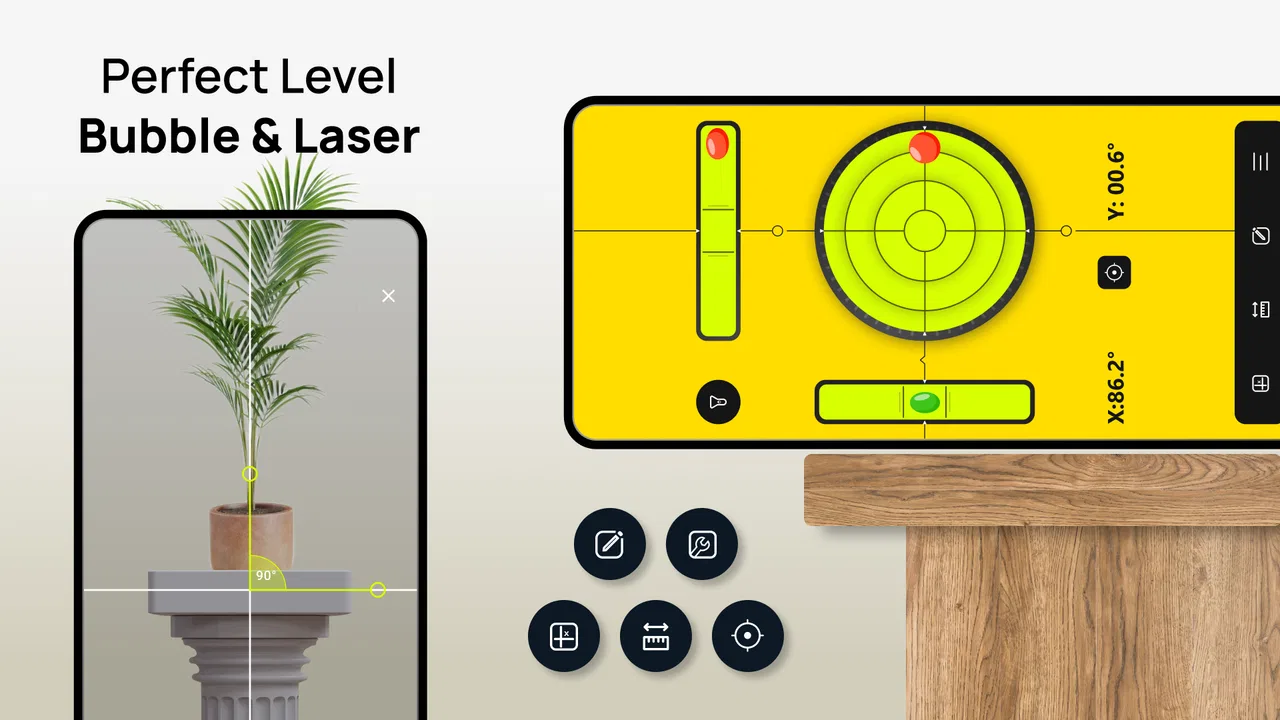
My first impression was practical rather than exciting. This is not an app designed to hold your attention for long sessions, and that is exactly the point. When I needed to check whether something was sitting straight, I could reach for the phone instead of searching through a toolbox. The interface focuses on the basic idea behind a bubble and laser level, making the purpose understandable without a tutorial-heavy introduction.
That simplicity also explains why the app has attracted a large audience. Perfect Level has passed 10 million installs and holds a 4.5 average rating from roughly 91 thousand ratings. Those figures do not make it automatically right for everyone, but they do match my experience of a focused tool that solves a familiar problem quickly.
You May Also Like

 Blood Strike: 2.5 Anniversary
Blood Strike’s Loadouts Turn Every Drop Into a Tactical Gamble
A close look at Blood Strike’s custom loadouts: how fast access to signature weapons reshapes its battle royale rhythm, rewards preparation, and narrows the gap between fights.

 Pandora - Music & Podcasts
Pandora’s Music Is Easy to Start, but Harder to Recover
Pandora’s strength is its low-effort path from a seed to a station. Its weak spot is how much confidence it asks you to place in connection, setup, and quiet recovery.

 8 Ball Pool
 Is Built on Rivalries, Rematches, and Routine
A close look at the rivalries, rematches, shared routines, and unanswered safety questions that turn a quick pool match into a persistent mobile community.

 Samsung Music
’s Quiet Strength Is Playing What You Already Own
Its reach comes less from spectacle than from dependable access to a personal library. That simplicity is both the app’s strongest retention engine and its ceiling.

 AccuWeather: Weather Radar
AccuWeather Review: A Quick, Clear Forecast for Everyday Decisions
For everyday plans, the best forecast is the one you can understand quickly. AccuWeather makes rain timing, radar, and local conditions easy to act on, with a few trade-offs.

 Hill Climb Racing
Why Hill Climb Racing Still Turns Crashes Into One More Run
A tiny car, a bumpy hill and one more upgrade: Hill Climb Racing keeps resurfacing because its simple chaos makes every near-miss feel personal.
More From Our News Desk



How Perfect Level feels during the first week
During the first week, the strongest benefit was convenience. I could use the phone as a temporary reference while positioning an object, rather than stopping to find a physical level. That is useful for hanging a picture, checking a small shelf, aligning a frame, or seeing whether a piece of furniture is visibly leaning. The app is especially handy when the job is too minor to justify buying or carrying another tool.
The bubble-style presentation is immediately familiar. I did not need specialist knowledge to understand what I was looking at: place the phone on or against the surface, watch the indicator, and adjust the object until it settles near the intended position. The laser-oriented element gives the app a more direct visual feel than a plain angle display, although I still treat it as a guide rather than a replacement for professional measuring equipment.
One useful habit is to pause before trusting the first reading. I place the phone consistently, check the surface in more than one orientation, and avoid pressing down on the device while making an adjustment. A case can also change how evenly the phone rests, so removing a bulky case may produce a more reliable contact with a flat surface. These are small details, but they matter more than repeatedly tapping the screen.
A realistic example is mounting a narrow wall shelf. I can first position the shelf loosely, use the app to identify whether the left or right side needs raising, then tighten the fixings gradually while checking again. The phone does not do the physical work, but it gives me a fast visual reference during the part of the job where small changes are easy to miss by eye.
For a picture frame, I use it differently. Rather than treating the phone as a permanent measuring instrument, I use it to establish a level reference before making the final adjustment by sight. This avoids overcorrecting, which is a common annoyance with small decorative objects. The app is most helpful when it supports a simple workflow instead of becoming the workflow.
What makes the early experience useful
The first-week advantage is that Perfect Level removes friction from occasional tasks. A traditional spirit level is more dependable for repeated building work, but it has to be stored somewhere and found when needed. A phone is usually already nearby. That makes this app a sensible backup for renters, students, new homeowners, and anyone assembling or rearranging things without a full tool collection.
I also like that the app does not require me to learn a complicated measurement system before getting value from it. The central interaction is visual, so the learning curve is short. If you understand that the bubble should be centered or that a projected reference should line up with an edge, you can begin using it almost immediately.
Still, the phone itself introduces limitations. Its shape, camera bump, case, and the exact surface being checked all influence how confidently I can interpret the result. A phone level is convenient because it is portable, not because it magically becomes more accurate than the hardware and placement allow. For a large construction project, a long physical level remains the better choice because it spans more of the surface and is easier to position consistently.
Who should try it first
I would recommend it first to people who need an occasional household reference rather than a dedicated trade tool. It suits quick checks during decorating, furniture placement, picture hanging, and light do-it-yourself work. It is also useful for someone who wants to test whether a physical level is needed before spending money on one.
On the other hand, I would skip relying on it for structural work, long runs of cabinetry, professional installation, or any task where a small error creates a safety problem. The free availability makes experimentation easy, but free access should not be confused with professional certification. That distinction is important if the surface must be precisely aligned over a large distance or if the result affects stability.
Whether it earns a place after the novelty fades
The more interesting question is not whether the app is fun to try, but whether I keep using it after the first few demonstrations. In my view, its recurring value comes from being an emergency tool. I may not open it every week, yet it remains useful whenever a small alignment question appears unexpectedly. That is a different kind of retention from a social or entertainment app: it earns space by being available at the right moment.
For month-to-month use, I would keep it installed if I were moving furniture, decorating, assembling shelves, or maintaining a home. Those activities create repeated opportunities for quick checks. Someone living in a settled space with no upcoming projects may rarely need it, and that is not a flaw so much as a limit of the category. A level tool has practical value in bursts, not necessarily as a daily habit.
The developer is listed as Cards, and the app has been available since Jul 21, 2014. That long presence makes it feel more like an established utility than a short-lived novelty. The current version is 4.1.6, and it supports devices running Android 8.0 or later. For a reader deciding whether an older phone can handle it, the operating-system requirement is the first compatibility detail worth checking.
Because the app is free, I can leave it installed without making a purchase decision before testing the basic experience. There are in-app purchases ranging from $0.99 to $99.99 per item, so I would pay attention to any optional purchase screen and decide whether it adds enough value to my particular use. For an occasional household check, I would begin with the free experience and only consider spending money if the extra functionality clearly improves a recurring workflow.
Building a practical routine around it
The best long-term routine is simple: use the app at the setup stage, confirm the result from another angle, and then put the phone away. I would not keep reopening it after every tiny adjustment. That creates unnecessary fatigue and can encourage false precision. A useful tool should shorten the job, not make me obsess over a display that may be affected by placement.
For repeated furniture work, I use a three-step approach. First, I choose a clean, stable contact point. Second, I check the object in the direction that matters, then rotate the phone or change its orientation to test the other axis. Third, I make the physical adjustment and check once more. This is more dependable than accepting a single reading from an awkward position.
Another non-obvious use is deciding whether a visible problem is actually the floor, the furniture, or the object placed on top. I can check the top surface, then check the furniture beneath it, and compare the results. That helps prevent me from correcting the wrong part. The app cannot diagnose the entire room, but it can make this small process more deliberate.
For travel or temporary accommodation, the app is more useful than carrying a dedicated tool for one short stay. I might use it to position a small monitor stand, check a folding table, or align a temporary shelf. The trade-off is that I must handle the phone carefully around dusty, wet, or unstable work areas. A physical tool is often easier to wipe clean and less stressful to place on a rough surface.
Maintenance is light, but accuracy depends on behavior
There is little maintenance in the usual sense. I do not need to calibrate a bubble vial or replace batteries in a separate device, and keeping the app available is mostly a matter of leaving it installed. The real maintenance burden is behavioral: keeping the phone surface clean, using a consistent contact position, and remembering that a case or camera bump can interfere with a flat placement.
That burden is small for casual work, but it becomes noticeable when I use the app repeatedly. A dedicated level has a shape designed for the job, while a phone is a fragile multipurpose object. I have to think about where I place it, whether the surface could scratch it, and whether I am accidentally touching the screen or shifting the device. Those interruptions are the price of convenience.
I also avoid using a soft object as the main contact surface. A cushion, thick fabric, or uneven protective layer can make the phone appear stable while allowing it to tilt slightly. If the object being checked is delicate, I prefer to use a clean intermediary surface or rely on a physical level. The app is at its best on controlled, accessible surfaces where the phone can rest without rocking.
Where fatigue begins
The novelty fades when I try to use the app for jobs that demand a long, straight reference. A phone can tell me about the point where it is placed, but it does not replace the reach of a long level. On a wide shelf or a long countertop, checking several positions may produce a more confusing picture than using the correct physical tool from the beginning.
There is also a mental fatigue that comes from treating every reading as exact. I find the app more comfortable when I use it to guide a practical adjustment rather than chase a perfect visual center. Walls, floors, and furniture often have small irregularities, and the best result may be the one that looks right and functions properly rather than the one that satisfies an overly strict screen reading.
Another reason to choose an alternative is safety. If I am checking something that supports weight, protects people, or must meet a professional standard, I want a purpose-built level and the appropriate installation method. Perfect Level is a helpful convenience tool, but it should not become the only verification step when the consequences of error are serious.
Some users may also prefer a dedicated app with more specialized measurement controls, while others may prefer a physical tool with no screen, notifications, or phone handling involved. The right choice depends on the task. This app wins on availability and quick access; a physical level wins on stability, reach, and confidence during demanding work.
My long-term verdict
After the initial curiosity wears off, Perfect Level remains worthwhile as a compact backup tool. Its lasting value is not constant use but reliable availability when a small alignment problem appears. I appreciate that it can turn a phone already in my hand into a useful reference, especially for decorating, furniture adjustments, and quick household checks.
I would keep it installed on a compatible device if I regularly moved things around or handled small do-it-yourself jobs. The free starting point makes that decision easy, while the Everyone rating keeps it approachable for a broad household audience. The app has enough practical purpose to survive beyond its first demonstration, provided I understand what it can and cannot replace.
My recommendation comes with a clear boundary: use it for convenience, not as a professional guarantee. Check placement carefully, test more than one orientation when the job matters, and switch to a dedicated level when the surface is large, the environment is rough, or accuracy affects safety. The lasting strength of Perfect Level is its readiness, not its ability to replace every tool in a toolbox.
For someone who wants an occasional leveling aid without buying another object, I think it earns a place on the phone. For a contractor, serious renovator, or anyone demanding repeatable precision across long surfaces, I would choose a physical level first and treat this app as a secondary check. That balance is what keeps it useful after the novelty disappears.
FAQs for Perfect Level (Bubble & Laser)
01What is Perfect Level (Bubble & Laser)?
Perfect Level (Bubble & Laser) is a casual puzzle game that combines bubble-shooting mechanics with laser-based challenges. After trying it, I found that the game focuses on aiming carefully, clearing targets, and solving increasingly demanding levels. It is designed for short play sessions, making it suitable for players who enjoy simple controls, colorful visuals, and progressively more strategic gameplay on a mobile device.
02How do you play Perfect Level (Bubble & Laser)?
The main gameplay is based on directing shots toward bubbles and other level targets while using laser elements to create the correct path or clear obstacles. Players generally need to consider angles, timing, and the order in which objects are hit. The controls are easy to understand, but later stages require more precision and planning rather than simply tapping as quickly as possible.
03Is Perfect Level (Bubble & Laser) free to download and play?
Perfect Level (Bubble & Laser) can generally be downloaded for free, although the exact availability and monetization options may depend on the Android or iOS version. Like many free casual games, it may include advertising, optional purchases, or additional features that can be unlocked. Before downloading, users should check the store listing for current in-app purchase details and device-specific conditions.
04Does Perfect Level (Bubble & Laser) require an internet connection?
The basic levels of Perfect Level (Bubble & Laser) may be playable without a constant internet connection, which is convenient for commuting or playing in areas with limited coverage. However, advertisements, updates, purchases, analytics, or other online services may require connectivity. Offline behavior can vary between versions, so it is best to test the game after installation rather than assuming every feature works without internet access.
05Is Perfect Level (Bubble & Laser) suitable for children and casual players?
Perfect Level (Bubble & Laser) is approachable for casual players because its controls are straightforward and the early levels introduce the mechanics gradually. Children may also enjoy the colorful puzzle format, but parents should review the age rating, advertising content, privacy information, and any in-app purchase options before allowing unsupervised play. Difficulty can increase over time, so younger players may need occasional guidance.
Pros
- Simple bubble-and-laser controls are easy to learn.
- Short levels make it suitable for quick gaming sessions.
- Colorful visuals keep the minimalist gameplay appealing.
- Offline play is convenient when no internet connection is available.
- Increasing challenges provide a satisfying sense of progression.
Cons
- Some levels may feel repetitive after extended play.
- Precision can be frustrating when laser angles are unforgiving.
- Ads may interrupt gameplay
- depending on the version.
- The game offers limited variety beyond its core mechanics.
- Progression may feel slow for players seeking constant rewards.

Perfect Level (Bubble & Laser)
Gallery